Export any loop as a lossless WAV file
Pull the exact studio recording out of Drum Lab, uncompressed, and share it straight into your DAW, AirDrop it to another device, or save it to Files.
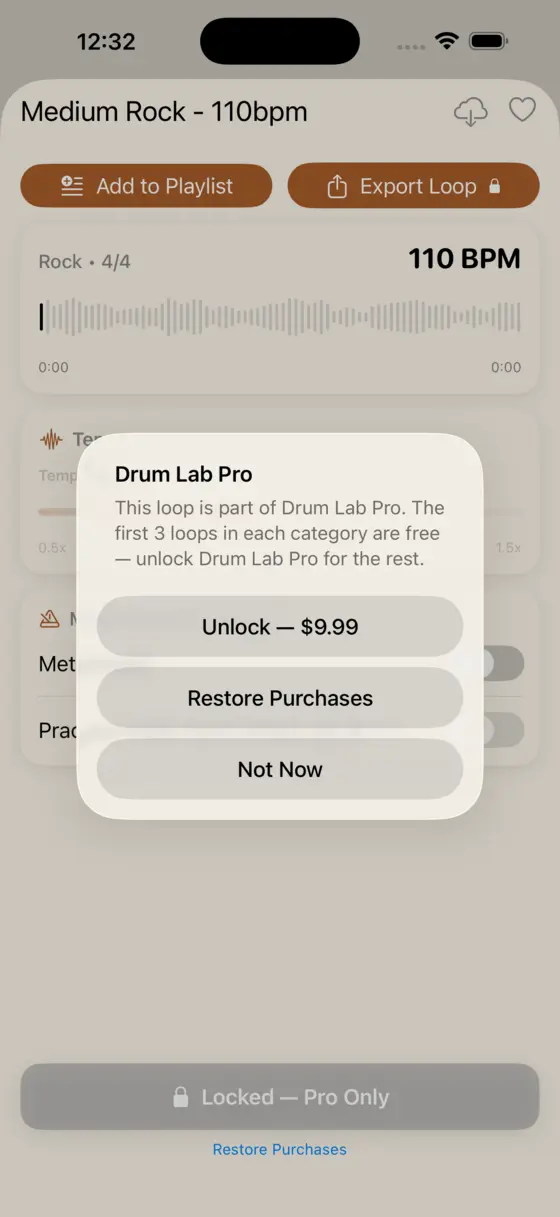
On any unlocked track's player screen, the export button fetches that track's lossless WAV master and opens the iOS share sheet, so you can send the real, uncompressed recording to another app, AirDrop it, or save it to Files.
Always the lossless master, never a re-compressed copy
Drum Lab streams and plays back a smaller, compressed copy of each track in the app, which keeps practice sessions light on storage and quick to load. Export works differently: it fetches the original, uncompressed WAV recording made for that loop, the same file the drummer recorded in the studio, not a re-encoded version of whatever happened to be playing.
Share it anywhere with one tap
Exporting hands the WAV file to the standard iOS share sheet, so where it goes next is up to you: AirDrop it to a Mac or another iPhone, save it to Files, send it over Messages or email, or hand it directly to another app that accepts audio, including most DAWs.
Frequently asked questions
Is exporting loops free?
No. Exporting is a Drum Lab Pro feature, included in the one-time $9.99 unlock alongside the full track library. It isn't sold separately, and there's no subscription.
What format does Drum Lab export?
A lossless WAV file: the original, uncompressed studio recording, not the smaller compressed copy the app uses for everyday streaming playback.
Where can I send an exported loop?
Exporting opens the standard iOS share sheet, so you can AirDrop it, save it to Files, send it by Messages or email, or hand it directly to another app, including most DAWs.
Get the full-quality loop out of your pocket
Free to download. Exporting unlocks with Drum Lab Pro, a one-time $9.99 purchase.
Download on the App Store