Producer Mode: make your drum loops sound like a record
Put any real, human-played loop through tape, punch, echo and reverb, blend it to taste, and bounce it straight into your DAW.
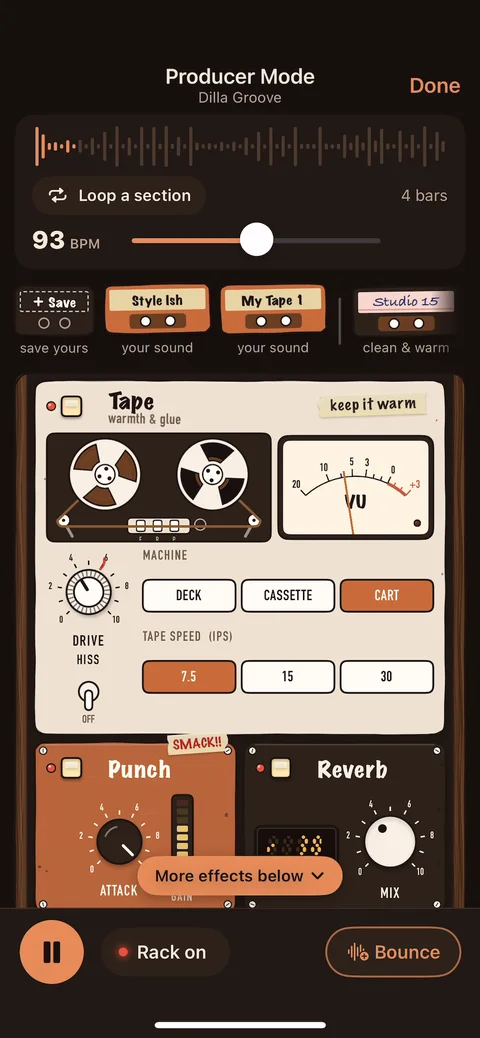
Producer Mode is Drum Lab's built-in effects rack. It opens from the player, keeps the loop strip on top (loop a section, set the tempo, play), and runs the drums through four units: Tape, Punch, Echo and Reverb, with a Blend fader from dry to wet. Start from a ready-made tape or save your own, then Bounce the result to a WAV.
See it in 15 seconds
Four units and a blend
Tape
Choose a deck, cassette or cart machine, a tape speed of 7.5, 15 or 30 ips, and how hard to drive it, with optional hiss. The VU meter moves with the drive.
Punch
One attack knob that makes the drums snap forward. Turn it all the way up and the unit tells you: SMACK!!
Echo
Echo time locked to the loop's tempo, with repeats and volume, from a quick slapback to spacey dub repeats.
Reverb
A single mix knob that puts the kit in a room, from a touch of air to a big live sound.
Over the whole rack sits a Blend fader, so you can go from the dry recording to fully wet, or anywhere in between, while the loop keeps playing.
Start from a tape, or make your own
Not sure where to start? Every setting can be saved as a tape. Five come ready-made:
- Studio 15clean & warm
- Dusty Cassettelo-fi & dusty
- Slapbackquick echo
- Dub Echospacey repeats
- Big Roomlive & roomy
When you find a sound you like, tap Save and it becomes one of your own tapes, ready for the next loop.
Bounce it to your DAW
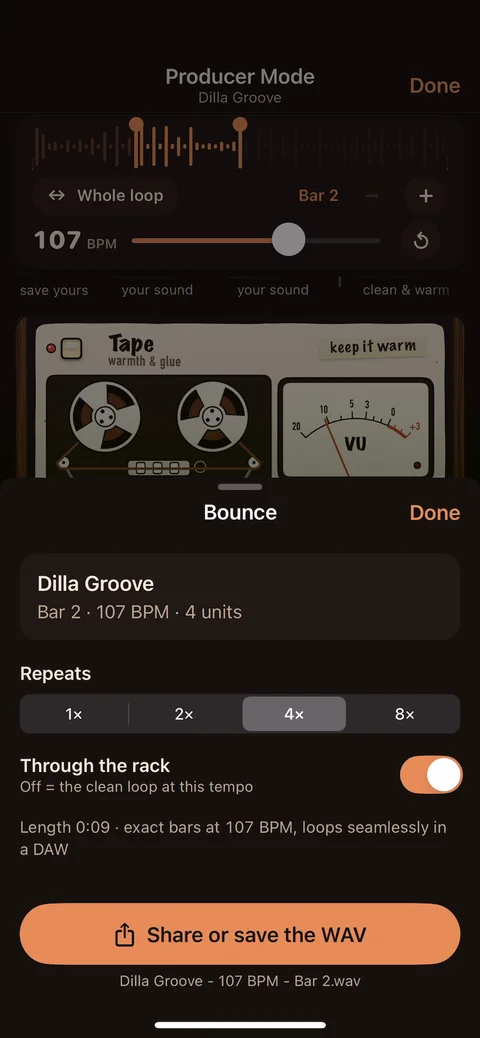
Bounce renders exactly what you hear: 1, 2, 4 or 8 passes of the bars you're looping, at your tempo, through the rack or clean. The WAV is exact bars, so it sits on the grid and loops seamlessly in a DAW, with the echo and reverb already ringing at the start.
Then share or save it like any file: AirDrop it to your Mac, save it to Files, or open it in another app. Bounce is part of Drum Lab Pro. For the clean studio recording on its own, use Export.
Who it's for
Practicing to a loop that sounds like a finished record is more fun, and it's closer to what you'll play over on a real track. Guitarists, bassists, keys players and singers can shape the groove to the song they're working on, songwriters can sketch with a drum loop that already has character, and anyone with a DAW can bounce the result and keep going.
Frequently asked questions
Is Producer Mode free?
Producer Mode works on the 3 loops you pick to keep free, and on every loop with Drum Lab Pro. It isn't available on the 10-second previews. Bounce, which renders your sound to a WAV, is a Drum Lab Pro feature.
What effects are in Producer Mode?
Four units and a blend: Tape (deck, cassette or cart machine, 7.5, 15 or 30 ips tape speed, drive and hiss), Punch, Echo in time with the loop (time, repeats and volume), and Reverb, plus a dry/wet Blend fader for the whole rack.
Does the metronome go through the effects?
No. The metronome and count-in clicks stay clean, so only the drums get the tape, punch, echo and reverb.
Can I use a bounced loop in my own music?
Yes. Bounce makes a WAV of exact bars at your tempo that loops seamlessly in a DAW, and Drum Lab Pro loops are royalty-free to use in your own music. See the audio license for the details.
Do I need to know studio gear to use it?
No. Start from a ready-made tape like Studio 15, Dusty Cassette, Slapback, Dub Echo or Big Room, then turn a knob or two by ear. When you like a sound, save it as your own tape.
Does Producer Mode work on iPad?
Yes. Drum Lab runs on iPhone and iPad, and on a large iPad the whole rack fits on screen at once.
Make your loops sound like a record
Free to download. Producer Mode works on the 3 loops you pick; Drum Lab Pro ($14.99) unlocks it on every loop, plus Bounce.
Download on the App Store